
BATTLE FOR MIDDLE EARTH
SPECIAL EDITION
SPECIAL EDITION
 Info: The Lord of the Rings: The Battle for Middle-earth is a PC real-time strategy game developed by EA Los Angeles. It is based on Peter Jackson's The Lord of the Rings film trilogy, in turn based on J. R. R. Tolkien's original novel. The game uses short video clips from the movies and a number of the voice actors, including the hobbits and wizards. It uses the SAGE engine from Command & Conquer: Generals and was released on December 6, 2004.The Game won three notable awards: the E3 2004 Game Critics Awards award for Best Strategy Game, the 2005 GIGA Games award for Best Strategy Game, and the GameSpy award for Best of E3 2004 Editors Choice.
Usage: Download the BFME Special Edition.iso and mount/insert on the Daemon Tools. You will need CD-Key to install the game. Use your legit CD-Key.
Special Edition Features:
- Only support English language
- Included all patches (1.00 till 1.04)
- Startup movies deleted to open game faster (EA Games, THX, Geforce, Intel Logo)
- Advanced Zoom out file included
- Faster installation
- Requirement less hard disc space than standart version
Primary link Alternative link

Battle for Middle Earth Patch 1.04
Info: This will install patch 1.04. The installer & patch are build by THORONGIL. There are two versions one for Windows 32-bit and the other for Windows 64-bit. You don't have to install 1.03 anymore.
Usage: Just download the file and double click it. Dont forget close your game before applying the patch.
32-Bit / 64-bit
Battle for Middle Earth Patchswitcher

Info: The Patchswitcher made by RIMLI and requires BfMe 1.03 as basis.The patches are installed as mods to make sure that you can play online. So remove all mods before you use another patch than 1.03. Otherwise, the game could not run properly and you could have to reinstall BfME.
Features: Easy installation.Switch the patch quickly and you can play online against other people with the same patch. Compatible with all languages
Usage: Just download the .exe file double click and follow the steps of installation.
REPINFO

Info:RepInfo is a replay manager, designed for the C&C Generals (CCG), C&C Generals Zero Hour (ZH), LOTR: The Battle For Middle Earth 2 (BFME2), LOTR: The Battle For Middle Earth (BFME), Lord Of The Rings - Rise of the Witch-King (RotWK), Company of Heroes (CoH), Dawn of War: Dark Crusade (DoW), Supreme Commander (SupCom) and Rise Of Nations - Rise Of Legends (RoL) games. This program shows you a lot of information about the players in the game, like what army they were and what colour they had etc. RepInfo saves replays automatically when it is turned on! That can be very handy when you forgot to save a replay. This feature is very useful for ladder players/tournament games.
Battle for Middle Earth Replay Manager
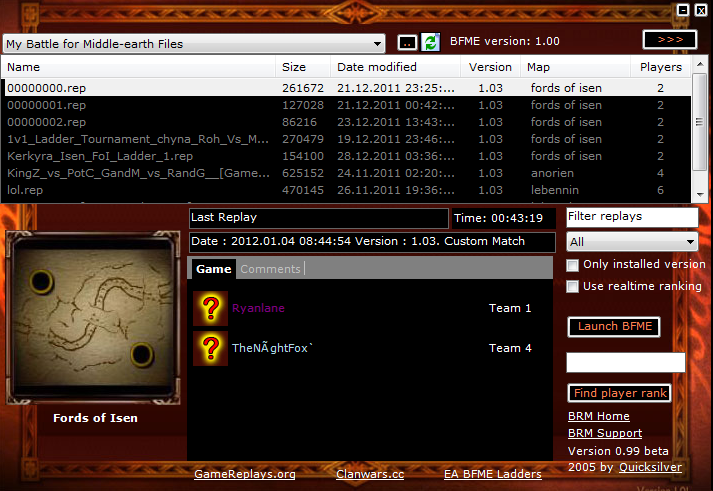 |
Info: This tool is very useful for organize your replays. You can rename replay names easily, also able to rename "replay in game name". If you are going to save a replay without naming, the game will give auto name as "Last Replay", you can change it with this tool. Also you can see that which players have been played in the replays and what was the their armies.(Random shows as "?")
Usage: Download the ReplayManager.zip and unzip/extract all files to one folder. Then click to BRM.exe to open program.
Ip Checker

Info: This tool gives you information about players Ips/Locations. You can take this information from Replays by using this tool.
Usage: Download IPChecker.exe and click it . Then browse the folder where your replays located. Thats all.
Battle For Middle Earth Vista & Win7 64 bit Patch

This file works for both BFME 1 and 2. To install the file extract the two files "Options", and "Maps" to the following location. Local Disk/Users/(your username)/AppData/Roaming/My Battle for Middle-earth Files
If the file AppData isn't there, do the following: Anywhere on the Local Disk, press alt on the keyboard, then tools on the toolbar that appears, then folder options. From here, click the View tab, then scroll through until you find "Show hidden files and folders". The file should now be there. However, don't go opening anything that is hidden on your computer, chances are they are hidden for a reason and messing around with them could cause serious problems.
Battle for Middle Earth Movie Killer

Battle For Middle Earth CD Images
 Info: After the BfME installation if you click the game to open, it will ask you to insert BfME Disc. If you dont have disc or you dont want to play with it, download these files.
Usage: After download the images.zip file extract/unzip them in a folder. Then go to Deamon Tools and right click the taskbar icon, pick virtual devices and click to "insert an image" and browse your image files where you extracted them in a folder. After these steps game will work without disc.
Advanced Zoom Out File
This files gives you ultra zoom out perspective as you can see in the pictures below. Download the file _WSMaps.rar and extract/unzip that to your game location "C:\Program Files\EA GAMES\The Battle for Middle-earth (tm)" or "C:\Program Files (x86)\EA GAMES\The Battle for Middle-earth™"
 |
| Without Zoom Out File |
 |
| With Zoom Out File |
